Pledge & Budgetby Budget Pro

Pledge & Budget, for weddings and events

Track every pledge. Plan every shilling. In one book the committee shares.

The budget, the pledges and every payment for a wedding, a kwanjula or a fundraiser, on the phone and on the web. Remind the people who still owe on WhatsApp in one tap, and know the total before the meeting ends.

  • Reminders on WhatsApp, at no cost
  • Works at a meeting with no network
  • 14 days free, no card
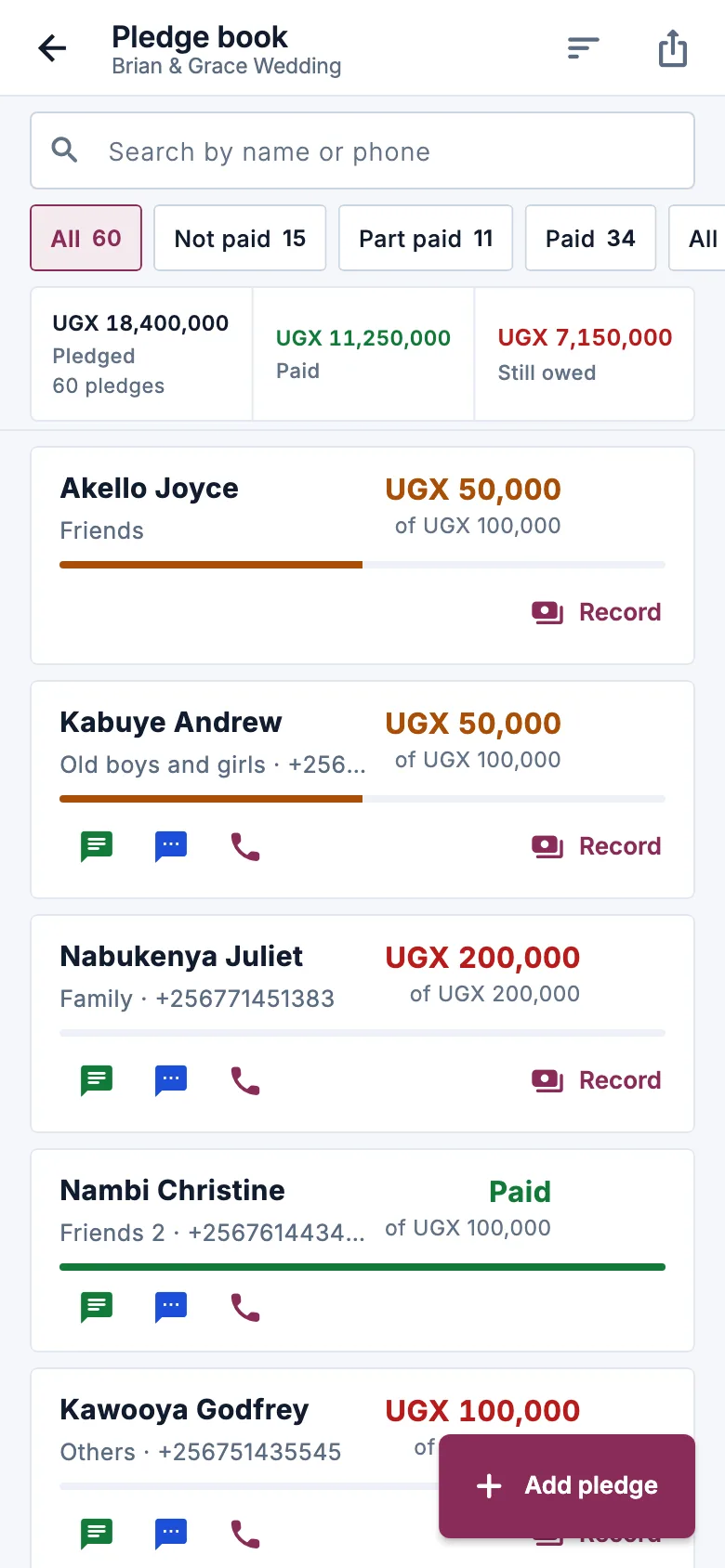
Pledge & Budget on a phone: the pledges for a wedding, each with what was pledged, what is paid and what is still owed.

Brian and Grace, 11 weeks before the wedding

The committee has met every Thursday since the introduction. Family, friends, workmates and the church have pledged UGX 18,400,000 between them.

Some have paid in full, some have paid half, and some have not paid anything yet. The treasurer needs to know who still owes, and the couple need to know whether the budget still fits. Pledge & Budget keeps both on the phones of the people who need them.

The home screen counts down to the day: 77 days to go, UGX 7,150,000 still owed in pledges, and UGX 840,909 needed each week to cover the budget. Below it, the few things worth a look: who has paid nothing yet, and which budget items have gone over.
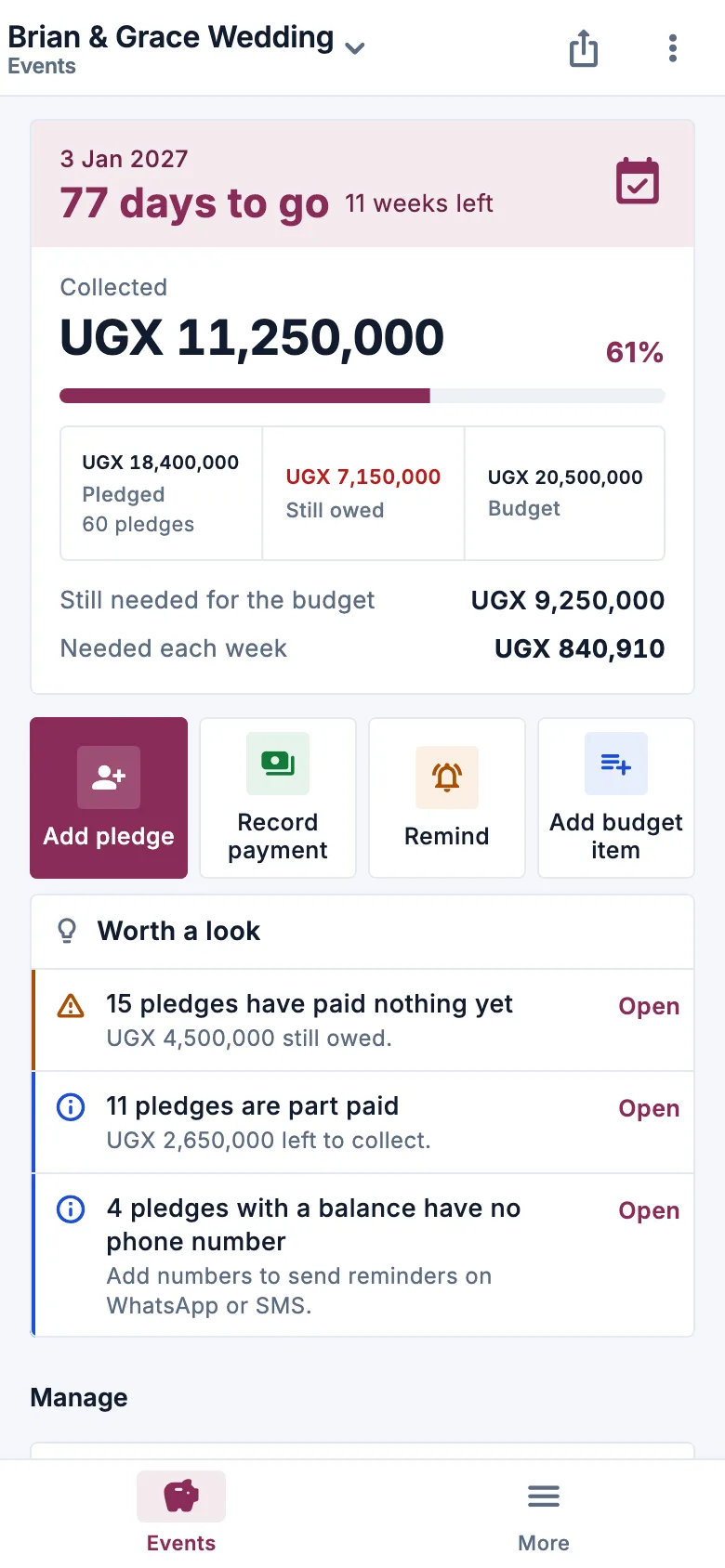
The Pledge & Budget home for a wedding: the date, 77 days to go, what is still owed in pledges and the amount needed each week.

Every pledge, every payment, and what is still owed

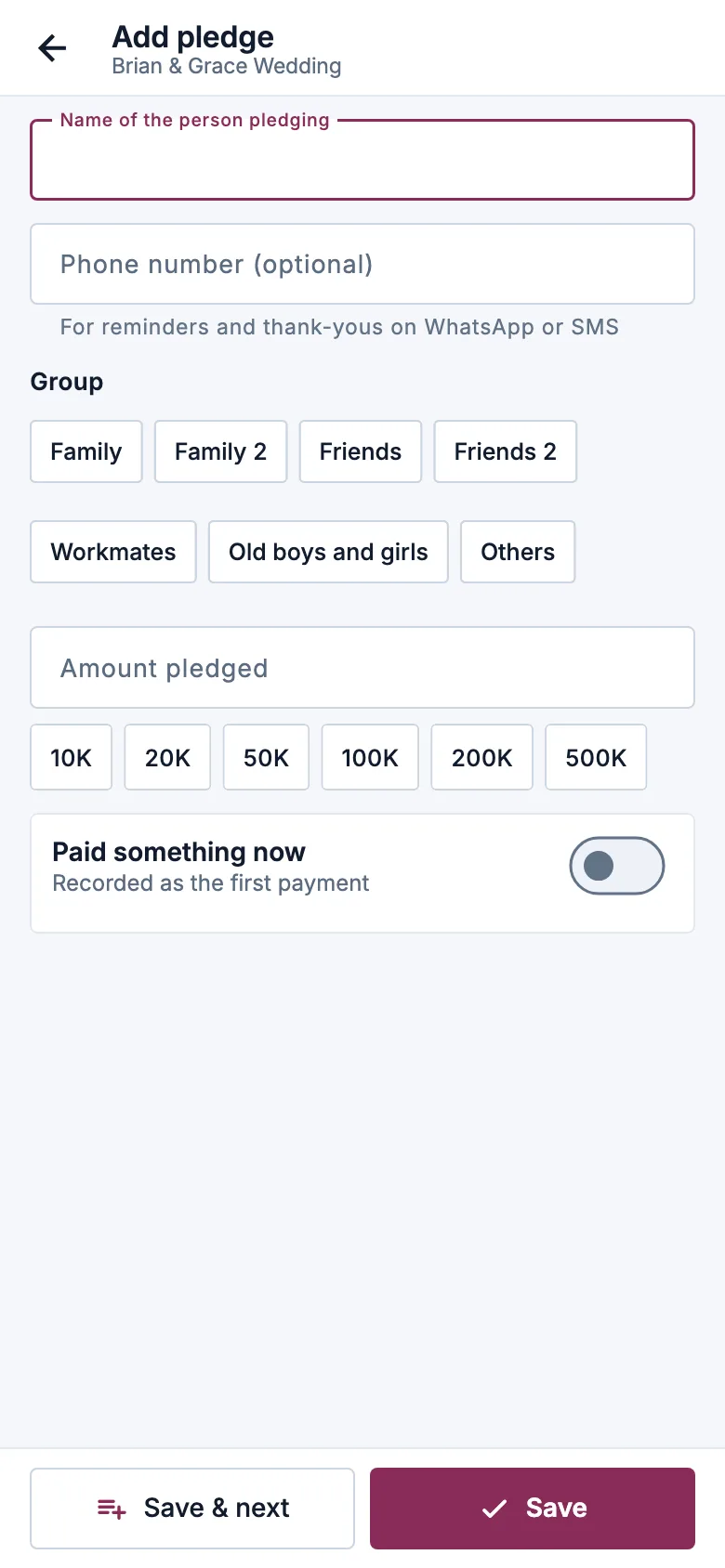
Write the pledge down the moment it is made, at the meeting, on the phone or on a computer.

  • A pledge in seconds: the name, a phone number, the amount and a group such as Family, Friends or Church. Take the first payment there and then if they pay on the spot.
  • Every payment kept, with its date. Pay in parts as often as they like. Each payment shows when, how and who received it, and the balance works itself out.
  • Mistakes are reversed, never erased. A wrong payment is reversed with a reason, so the history always adds up.
  • Find anyone fast: search, then show only Not paid, Part paid or Paid, by group, with the totals for exactly what you see.
  • Many pledges at once on the web: paste the list from the meeting, check the preview, then save. Download it as a spreadsheet or print it.
Adding a pledge in Pledge & Budget: the event, the name and the amount.

Remind the ones who still owe. Thank the ones who paid.

Reminders and thank-yous go from your own WhatsApp, so they cost nothing extra and come from a number people know.

  • One tap per person: the message is already written with their name, their balance, the event and the date.
  • Remind everyone with a balance in one go: you are taken from one person to the next, and anyone with no phone number is skipped.
  • A thank-you when they pay, and a payment confirmation to share, so nobody wonders whether their money arrived.
  • Call or send an SMS instead from the same screen, when WhatsApp is not the way.
The pledge list in Pledge & Budget, with who has paid in full, who has paid part and who still owes.

A budget that shows what is left

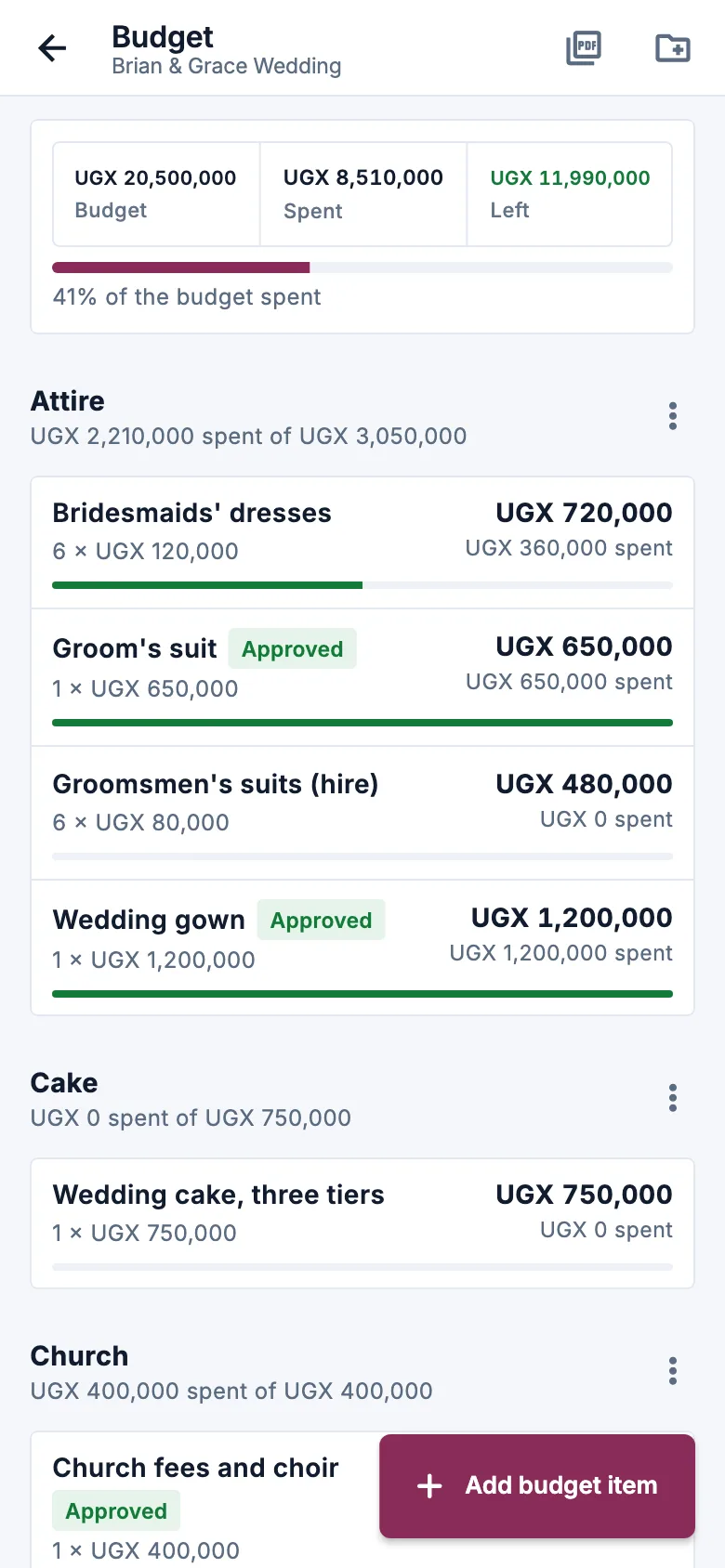
Group the spending your way: venue, food, drinks, decor, attire, transport, photography. Each category adds up its own items.

  • Quantity times price: 300 sodas at UGX 1,500 is a target of UGX 450,000, worked out for you.
  • Spent so far and the balance for every item, and a warning when an item goes over its target.
  • Totals for each event: the budget, what is pledged, what is collected and what is spent.
  • A budget report as a PDF, from the phone or a computer, for the committee meeting.
The Pledge & Budget budget for a wedding: categories such as venue, food and decor, each with its target and how far along it is.

One book for the whole committee

Give each committee member a role on the event, with their own login on their own phone or computer.

  • A role for each person on each event: the chair runs the event, the treasurer records payments, the secretary and members write down pledges, and viewers only look.
  • Money has a name next to it. Only the treasurer and the chair record or reverse payments, and every payment shows who received it.
  • It works at the meeting. Pledges and payments written down with no network are saved on the phone and sent later.
  • Several events, one account: the kwanjula, the wedding and the next fundraiser, side by side.

What committees ask us first

Something else on your mind? Ask us.

Can the whole committee use it?

Yes. Add committee members to your account, each with their own login, then give each one a role on the event: chair, treasurer, secretary, member or viewer. The chair runs the event and its committee, the treasurer records payments, the secretary and members write down pledges, and a viewer only looks. Whoever creates an event becomes its chair.

Does it send pledge reminders?

You send them in one tap, from your own WhatsApp, so there is no charge for messages. Each reminder is written for you with the person's name, their balance, the event and the date. "Remind everyone with a balance" takes you from one person to the next. After a payment, a thank-you and a payment confirmation are ready to send the same way. Nothing is sent automatically.

Can I record part payments?

Yes, as many as they like. Every payment is kept with its date, the amount, how it was paid and who received it, and the balance works itself out. A payment recorded by mistake is reversed with a reason instead of being deleted, so the history always adds up.

What happens after the wedding?

Close the event. Nothing is deleted: the pledges, the payments and the budget stay in your account, and the next event, a kwanjula or a fundraiser, starts in the same account. Each event's budget prints as a PDF report, from the phone or a computer.

Who can see who pledged what?

Your events sit in your account, behind your sign-in, and only the people you add can open them, each within their role. A printed list or a share link opens without signing in for whoever you send it to, so send it only to the committee.

Does it work at a meeting with no network?

Yes. Pledges, payments and budget items are saved on the phone and sent when the network comes back. Opening a share link or a printed report needs a connection.

Can I pay by the year?

Yes. Pay monthly or yearly by card, or by mobile money where your country has it, from inside your account. You can change plan at any time.

Who do I talk to if I get stuck?

Call us on +256 783 204 665 or send us a WhatsApp message (Monday to Saturday, 8:00 to 20:00), or use the contact page and a person will reply, usually within one working day.

Pledge & Budget on your phone

An Android app for the treasurer and the committee, with the same account as the web.

Coming soon to Google Play

Open your account today and run the event on the web. The same sign-in opens Pledge & Budget on the day it arrives on Google Play.

Write down the first pledge tonight.

14 days free, no card.

Questions first? WhatsApp us on +256 783 204 665 (Monday to Saturday, 8:00 to 20:00).

Chat with us