Pledge & Budgetby Budget Pro

Features of Pledge & Budget and the family

Everything the shop, the farm and the event need, on one account.

Shelfie runs the shop, Kuku Tally keeps the farm book and Pledge & Budget plans the event. Budget Pro has all three. Every picture on this page is the real app.

The shop, in Shelfie and Budget Pro

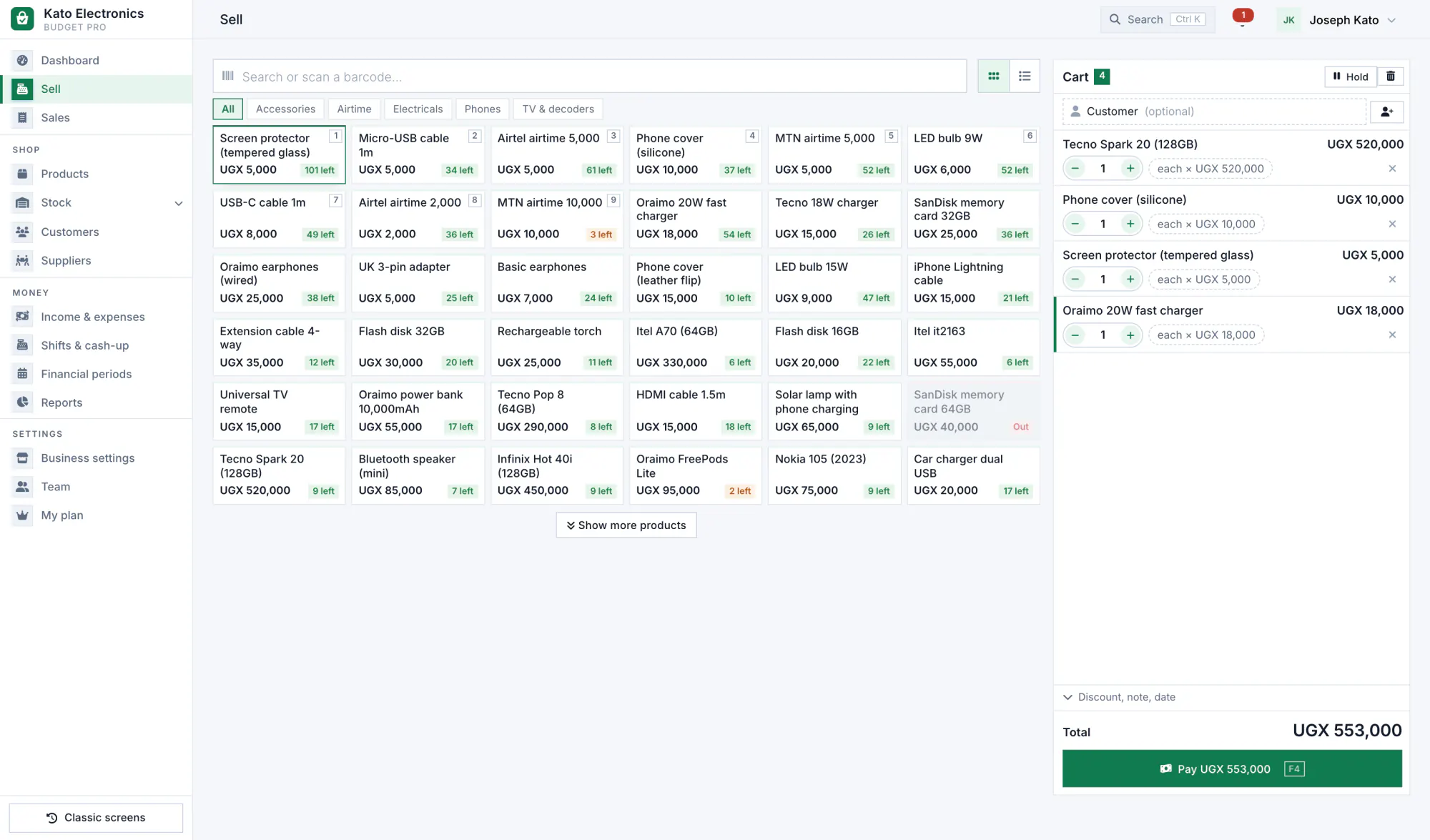
A till that keeps up with a busy counter

Find the item, take the money, hand over the receipt.

  • Search or scan by name, code or barcode.
  • Cash, mobile money, card, bank or credit, or one sale split across several, with the change worked out.
  • Pack sizes: sell a single, a dozen or a carton, each with its own price, and the stock counted in pieces.
  • Returns and voids with a reason. Good items go back on the shelf; faulty ones are written off.
  • Shifts and cash-up: open with a float, count the drawer at closing, see any difference.
The Budget Pro till on a computer: products on the left and a cart with the total on the right.

Know what is on the shelf, and why

Stock is never a number someone typed over. Every item in and out is its own entry with a reason and a name.

  • Every movement: sales, deliveries, damage, returns, counts and transfers.
  • A minimum for each product and a reorder list with suggested quantities.
  • Stock counts: count the shelf and the differences are posted for you.
  • Batches and expiry dates for pharmacies and agro-vets.
  • Branches and transfers on the plans that include them.
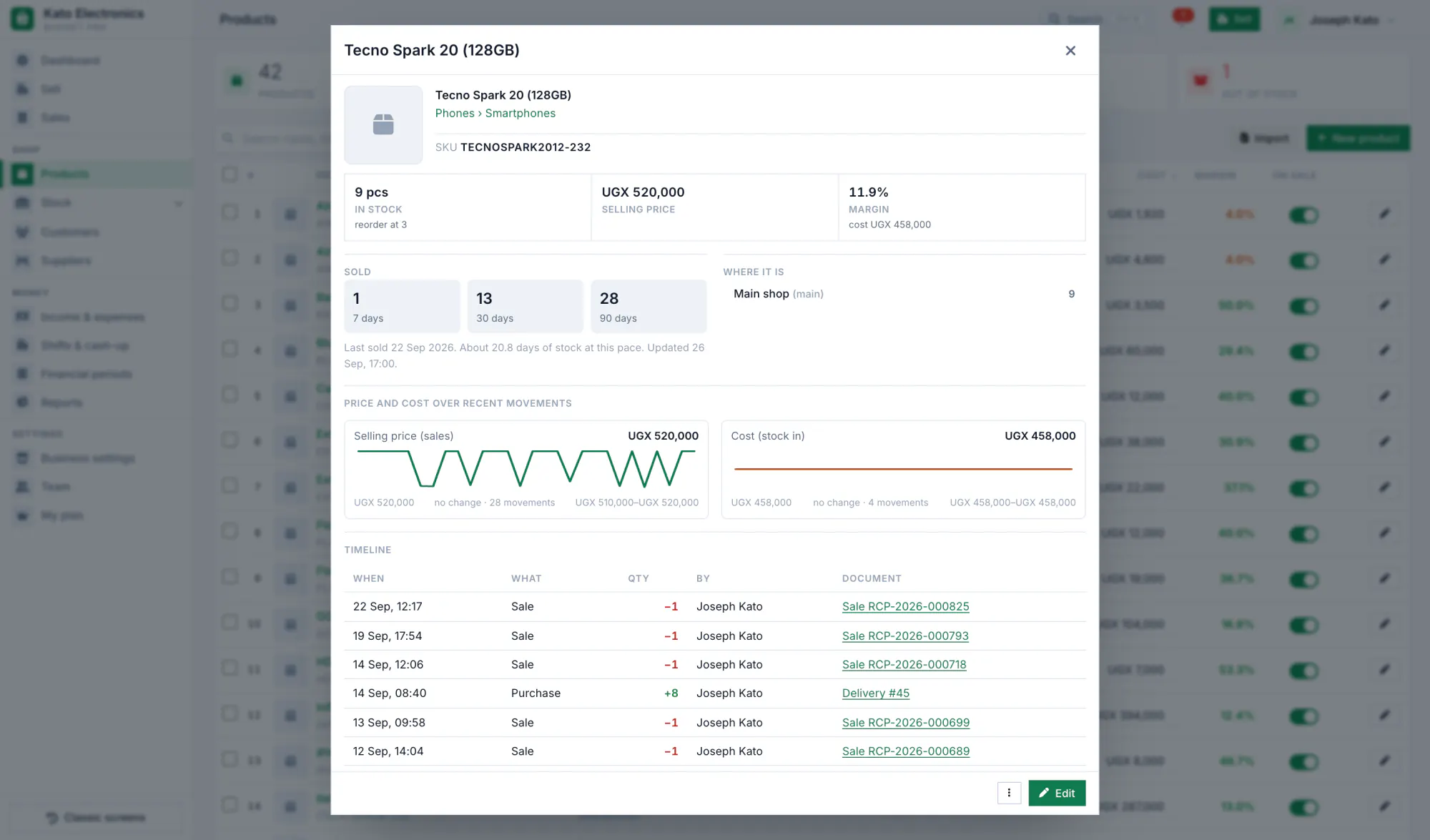
A product in Budget Pro: stock on hand, prices and its list of movements.

A debt book that never forgets

Credit sales land in the customer's account by themselves, with every sale and payment behind the balance.

  • Credit limits and payment terms for each customer.
  • Payments in full or in parts, by any method.
  • Statements you can print or send.
  • Reminders on WhatsApp or SMS: by hand, or at most once a week for overdue balances when you switch it on.
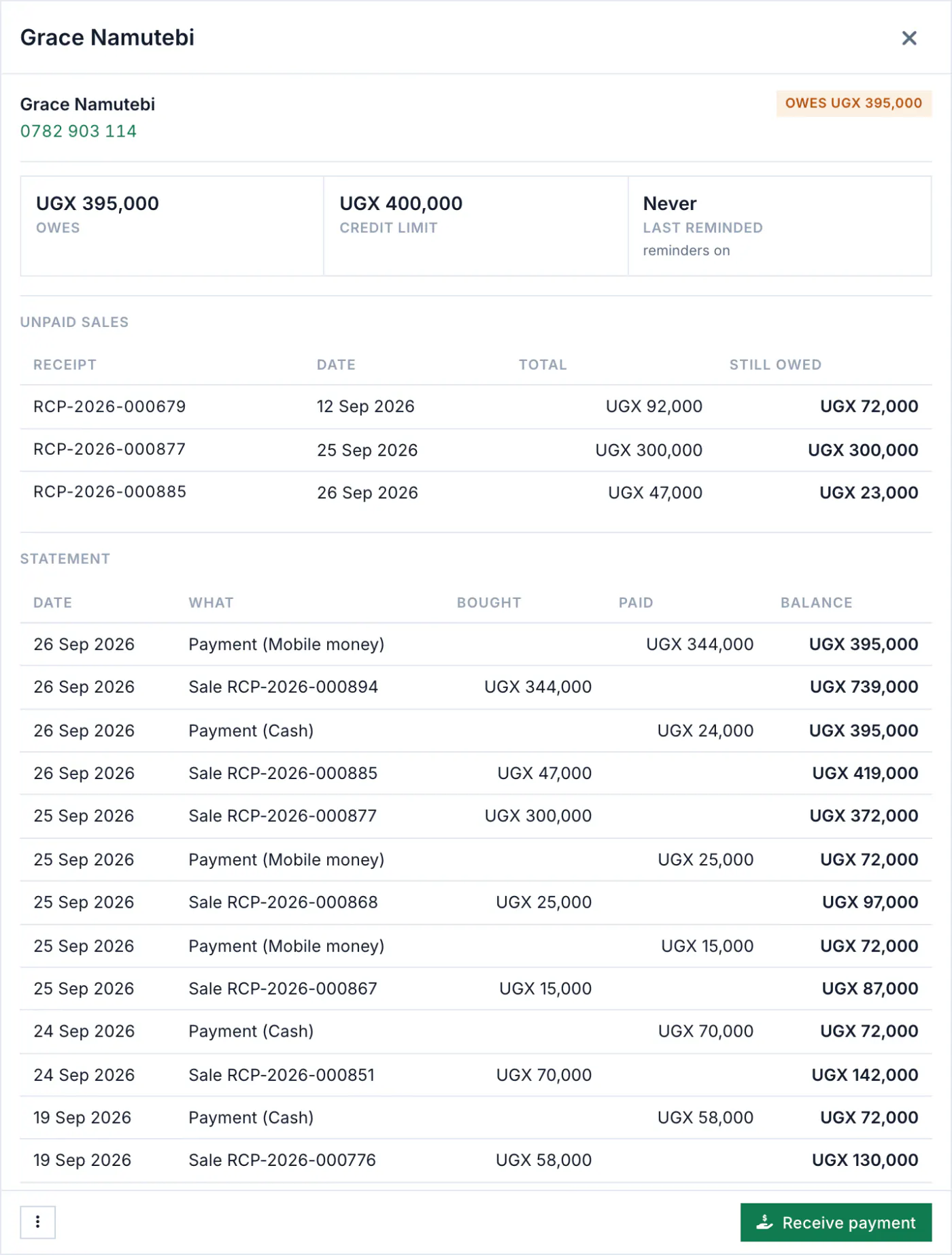
A customer's statement in Budget Pro with credit sales, payments and the running balance.

From the order to the shelf to the payment

Buying is recorded as carefully as selling, so your costs and what you owe each supplier stay right.

  1. Order. Send the supplier a numbered purchase order.
  2. Receive. Tick what arrived. Stock and buying prices update.
  3. Pay. In full or in parts. The supplier's balance follows.
  4. Return. Send back what is faulty. Stock and balance are corrected.
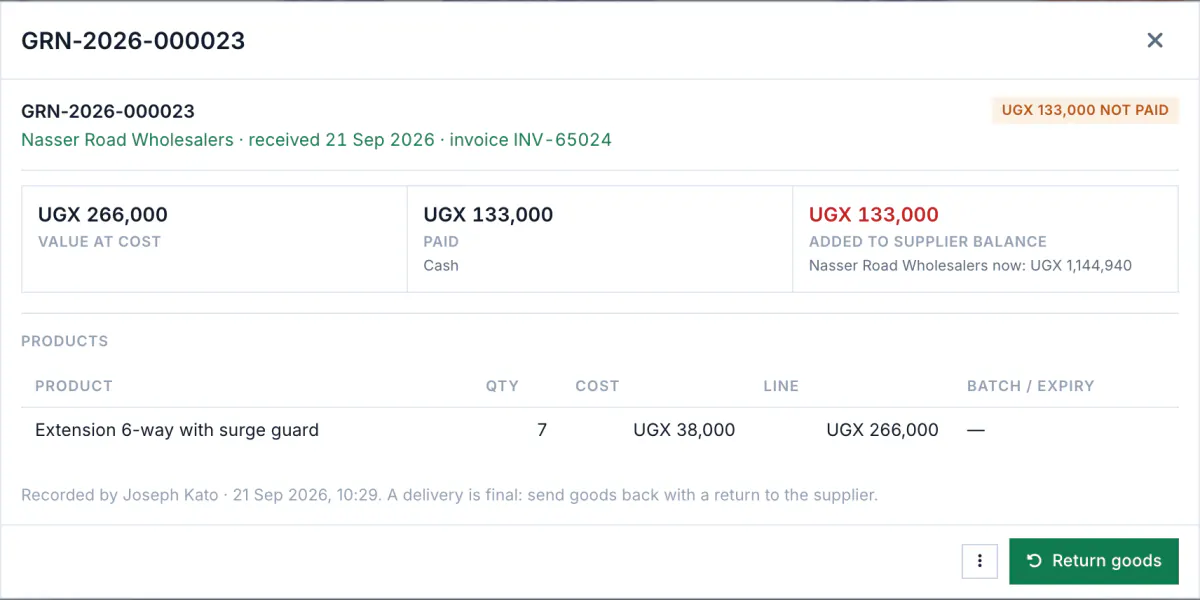
A supplier delivery in Budget Pro with the items received, their cost and the amount paid.

Your real profit, not just your sales

Profit is worked out from what each item cost you, then your expenses come off: rent, transport, salaries, airtime.

22 ready reports for any dates, as PDF or Excel:

  • Sales summary
  • Profit & margin
  • Stock on hand & value
  • Low stock
  • Dead stock (not selling)
  • Best sellers
  • What customers owe (aging)
  • What we owe suppliers
  • Cash-up by shift
  • VAT summary
  • Purchases
  • Stock movement audit
  • Expiring stock
  • Income statement (profit & loss)
  • Category & margin
  • Basket & busy hours
  • ABC analysis & days of cover
  • Shrink (write-offs)
  • Cash control by cashier
  • Promotion results
  • Gift cards, store credit & points
  • Supplier scorecard
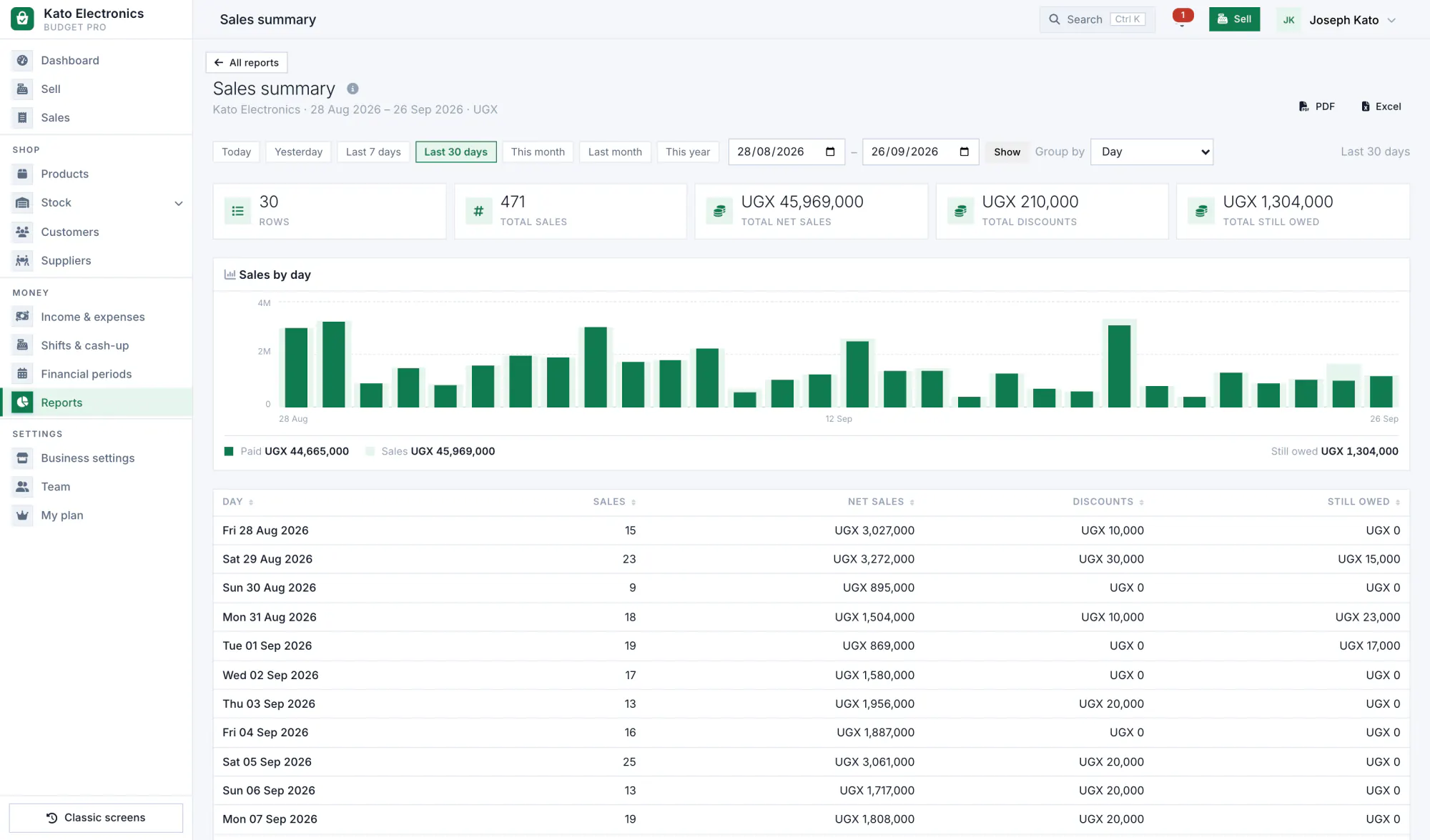
The Budget Pro reports screen with a sales report for the last 30 days.

Give every person the right keys

Each member of staff gets their own login and a role. The role decides what they can do and see, on the phone and on the computer. Every sale, void, payment and stock change records who made it.

What each staff role can do
OwnerManagerCashierStock keeperAccountantViewer
Sell and take payments Yes Yes Yes No No No
Give discounts and change prices Yes Yes No No No No
Void a sale Yes Yes No No No No
Take returns and refund Yes Yes Yes No No No
Receive stock and manage suppliers Yes Yes No Yes No No
Adjust stock (damage, loss, corrections) Yes Yes No Yes No No
See cost prices Yes Yes No Yes Yes No
See profit Yes Yes No No Yes No
See reports and dashboards Yes Yes No No Yes Yes
Invite and manage team members Yes No No No No No

Owner

  • Sell and take payments
  • Give discounts and change prices
  • Void a sale
  • Take returns and refund
  • Receive stock and manage suppliers
  • Adjust stock (damage, loss, corrections)
  • See cost prices
  • See profit
  • See reports and dashboards
  • Invite and manage team members

Manager

  • Sell and take payments
  • Give discounts and change prices
  • Void a sale
  • Take returns and refund
  • Receive stock and manage suppliers
  • Adjust stock (damage, loss, corrections)
  • See cost prices
  • See profit
  • See reports and dashboards

Cashier

  • Sell and take payments
  • Take returns and refund

Stock keeper

  • Receive stock and manage suppliers
  • Adjust stock (damage, loss, corrections)
  • See cost prices

Accountant

  • See cost prices
  • See profit
  • See reports and dashboards

Viewer

  • See reports and dashboards

Owners can do everything, including billing, the team and settings.

The poultry farm, in Kuku Tally and Budget Pro

A farm book that adds itself up

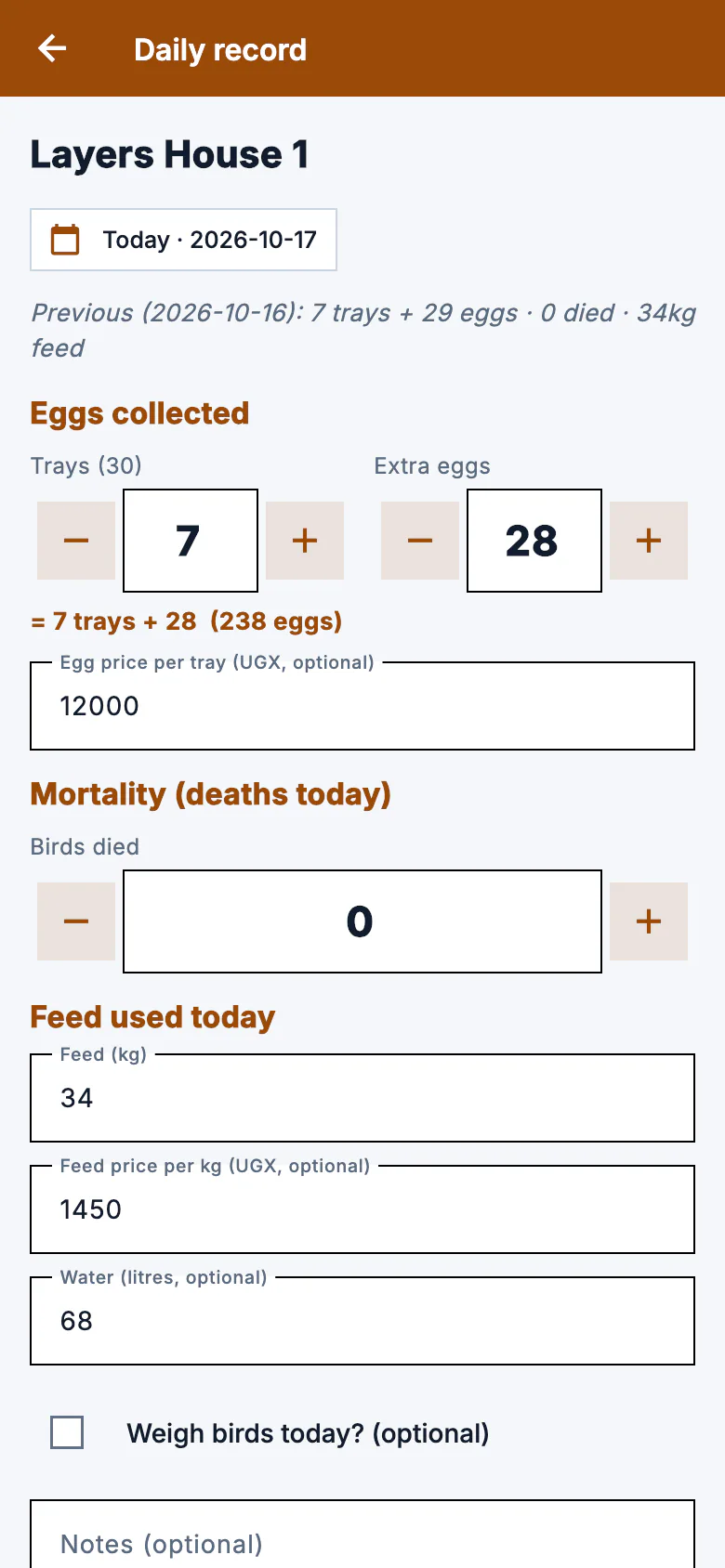
The daily card takes a minute. Kuku Tally turns it into the lay rate, the feed left, what is due and the profit on each batch.

  • The daily card for each batch: eggs in trays and pieces, feed, water, deaths and notes.
  • Feed bought and used, and a warning when about a week of feed is left.
  • Health: deaths with the cause, treatments, and a vaccination plan with what is due.
  • Sales of eggs, birds and manure, on credit too, with what each customer owes.
  • Profit for each batch, the cost per tray and per bird, and the feed conversion ratio for broilers.

See Kuku Tally

The Kuku Tally daily card for a layers batch: trays and extra eggs, feed, water, birds that died and notes.

Events, in Pledge & Budget and Budget Pro

Pledges and a budget for any event

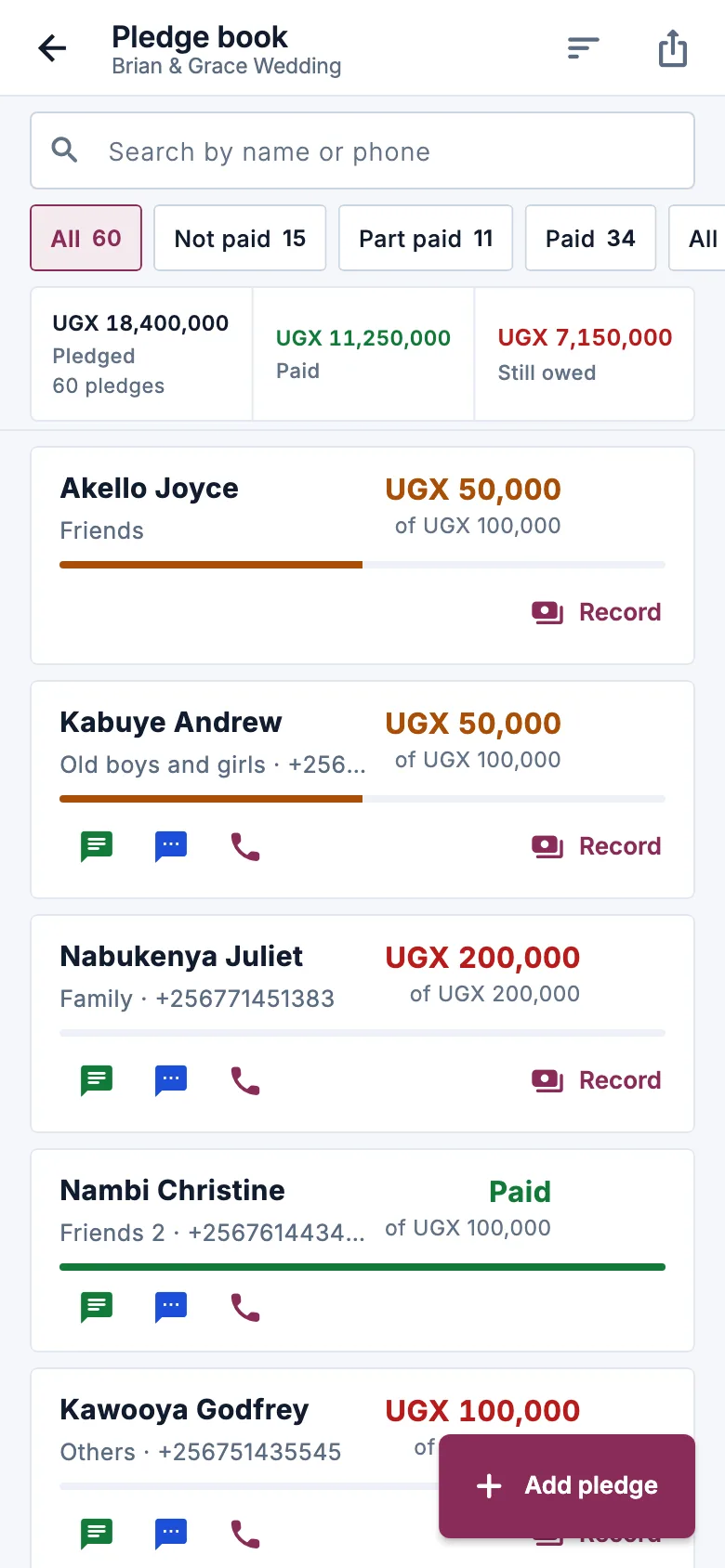
For a wedding or a fundraiser: who pledged what, what is paid, what is still owed, and whether the budget still fits.

  • Every pledge with what is paid so far and the balance, and who received the money.
  • A budget by category, each item worked out from quantity and price, with what is paid and what is left.
  • Several events on one account, each with its own pledges and budget.
  • The whole committee on the same figures, each with their own login.

See Pledge & Budget

The Pledge & Budget pledge list: each person with what they pledged, what they have paid and what is still owed.

The apps keep working with no network

Each Android app saves to the phone first and catches up by itself when the connection is back.

  • Sell, fill in the daily card or write down a pledge offline. Nothing is typed twice.
  • Several phones, one account: each sees the others' records once they sync.
  • A PIN locks the app on a shared phone.

Get the phone apps

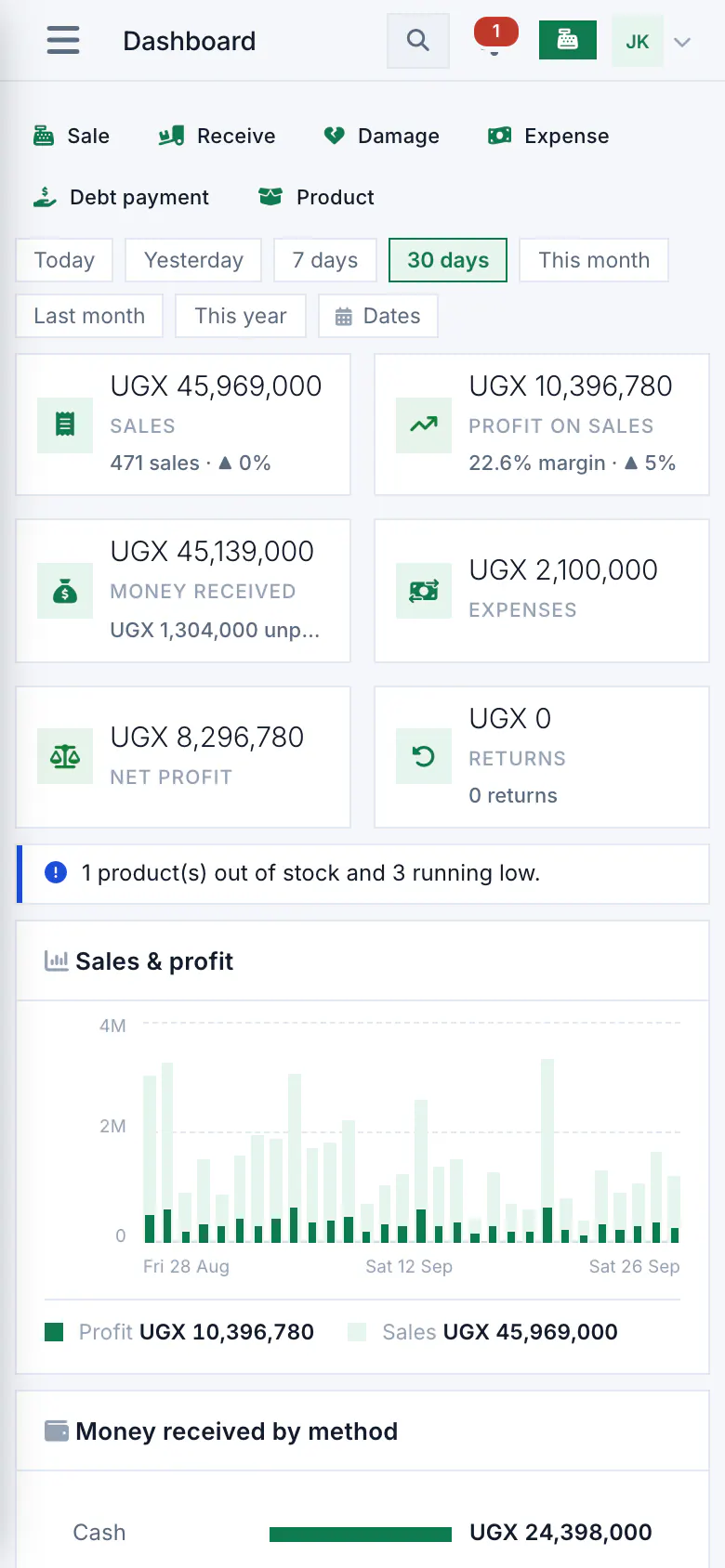
The Budget Pro dashboard at phone size, with today's sales and alerts.
The dashboard in a phone's browser.

Tax, e-invoicing and printers

Straight answers, because these decide whether the shop app fits your shop.

VAT and sales tax

Set your shop's VAT rate and the VAT summary report works out the VAT in your sales and your purchases for any dates, and what is payable, for you or your accountant to use for your return.

A connector for one national e-invoicing system is built. It issues electronic tax receipts only after it is certified on the tax authority's test system with your business's own credentials, so until then keep using your approved system for those.

Printers and scanners

The phone app prints to Bluetooth thermal printers, the common 58 mm and 80 mm kind. On a computer, receipts open sized for 58 mm or 80 mm paper and print on any printer the computer can use.

A USB barcode scanner works at the till like a keyboard. Every receipt can also go out on WhatsApp or as a PDF.

Try it with your own records

14 days free, no card. How we keep your records safe

Chat with us